
Tired of manually hunting down and fixing errors in your spreadsheets? Excel’s Find and Replace tool is your time-saving superhero. Whether you need to correct typos, update product codes, or standardize formatting, this simple feature can transform your data cleanup process.
Unleash the Power of Find and Replace:
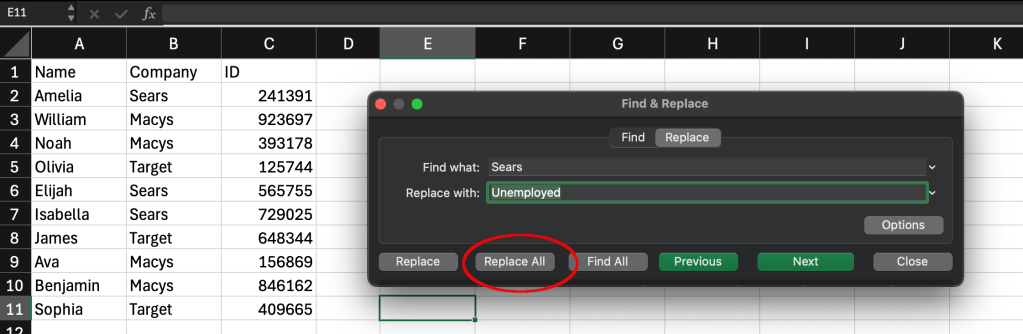
Find and Replace, accessible with the keyboard shortcut Ctrl+H or through the Home tab, is your go-to tool for making targeted changes to your data. Simply enter the text or value you want to find in the “Find what” field, and then enter the replacement in the “Replace with” field. Click “Replace” to update individual instances, or “Replace All” to modify every occurrence in your selected range or entire worksheet.
A Real World Example:
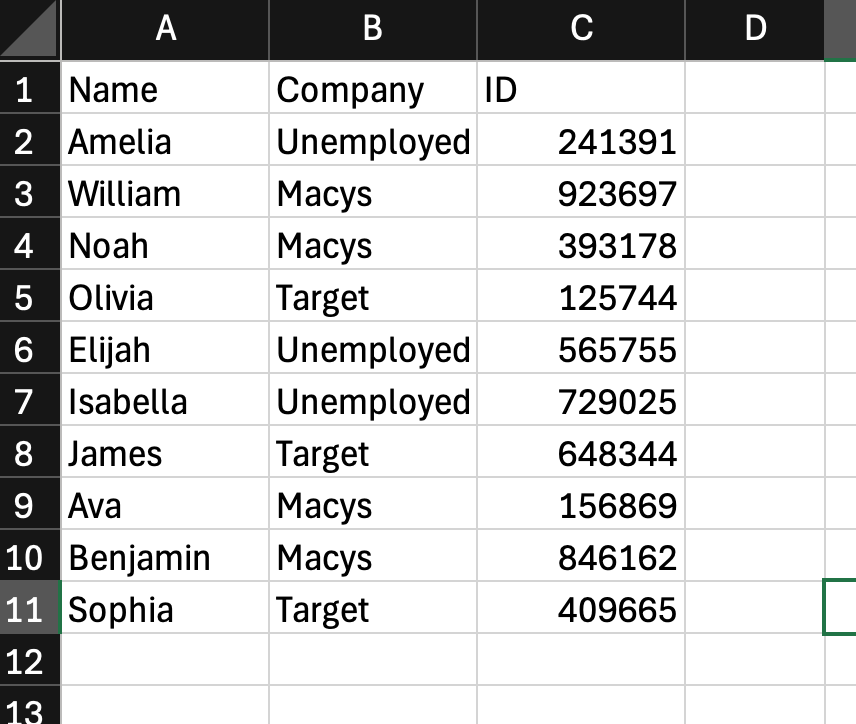
You’re given a spreadsheet with various employees, their company, and their ID. You want to replace every occurrence of the company “Sears” with “Unemployed”. Doing this by hand will take a while, but with the steps above, you can do this operation in once action.
Conclusion:
Don’t waste time on tedious manual edits. Embrace Excel’s Find and Replace tool and transform your data cleanup process into a breeze. With a few clicks, you can fix errors, update values, and standardize formatting across your spreadsheets, freeing up your time for more valuable tasks.

 Speed Up Work
Leave a comment